TracCloud: Campus IP Address Blocks: Difference between revisions
From Redrock Wiki
No edit summary |
No edit summary |
||
| (5 intermediate revisions by the same user not shown) | |||
| Line 1: | Line 1: | ||
{{TracCloudGuideTabs}} | {{TracCloudGuideTabs}} | ||
<div class="tcWidgetPage"> | <div class="tcWidgetPage"> | ||
<div class=" | <div class="categoryWider"> | ||
{{TracCloudGuideGlobalTOC}} | {{TracCloudGuideGlobalTOC}} | ||
</div> | </div> | ||
< | <div class="pageTitle">Campus IP Address Blocks</div> | ||
This feature allows you to designate certain IP addresses (specific or a range) as On/Off Campus, or to a custom "Zone." This is used for modification logs and kiosk access.<br><br> | This feature allows you to designate certain IP addresses (specific or a range) as On/Off Campus, or to a custom "Zone." This is used for modification logs and kiosk access if configured in [[TracCloudGuideProfileGroups|permission groups]].<br><br> | ||
<i>Other > Other Options > System Preferences > Campus IP Address Blocks</i> | |||
[[File:3737833.png|800px]]<br><br> | [[File:3737833.png|800px]]<br><br> | ||
| Line 29: | Line 31: | ||
::[[File:6108905.png|900px]] | ::[[File:6108905.png|900px]] | ||
[[Category:TracCloud]] | <hr> | ||
<i>See Also</i> | |||
* [[TracCloudGuideProfileGroups|Permission Groups]] - Work visit logins can be restricted based on IP zone under the 'Log In/Out' tab. | |||
[[Category:TracCloud Manual]] | |||
</div> | </div> | ||
Latest revision as of 16:40, 29 July 2025
Campus IP Address Blocks
This feature allows you to designate certain IP addresses (specific or a range) as On/Off Campus, or to a custom "Zone." This is used for modification logs and kiosk access if configured in permission groups.
Other > Other Options > System Preferences > Campus IP Address Blocks

- On Campus Zone Name & Off Campus Zone Name
- This is the phrasing for your on/off-campus addresses. "On-site," "Campus Network," "Outside," etc.
- On Campus IP Blocks
- This is the actual IP address list that determines what IPs are recorded as being on-campus. If listing a specific device, you can type the IPV4 address here directly. If listing a range of IPs, you would format this as "...0.0/0" with the CIDR notation at the end, as seen in the screenshot above denoting "Campus Wifi."
- Test IP Address
- This is a utility that lets you check a specific IP address to see if it's computed as on or off campus, to verify your current configuration.
- This is a utility that lets you check a specific IP address to see if it's computed as on or off campus, to verify your current configuration.
Usage
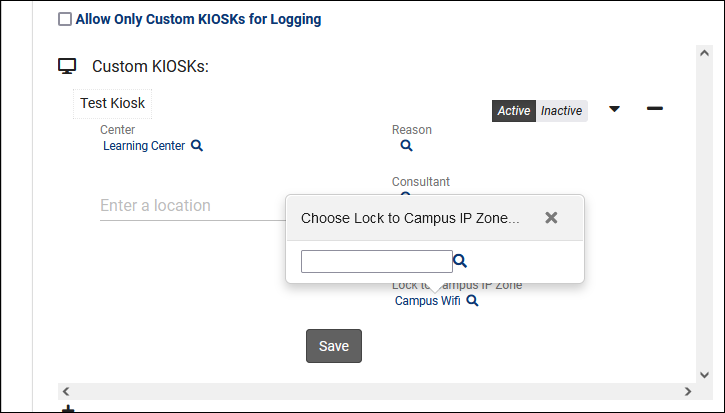
- Custom Kiosks
- Custom Kiosks can be locked to a particular IP address to prevent users from accessing the kiosk from unauthorized networks. More information on Custom Kiosks.

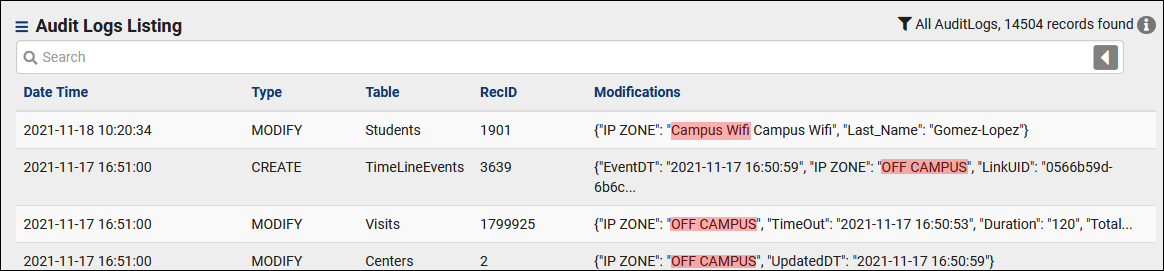
- Logging
- When reviewing Audit Logs as a SysAdmin, this allows you to more easily differentiate changes made on-campus versus off.

See Also
- Permission Groups - Work visit logins can be restricted based on IP zone under the 'Log In/Out' tab.