TracCloud: Campus IP Address Blocks
From Redrock Wiki
Global Preferences
Campus IP Address Blocks
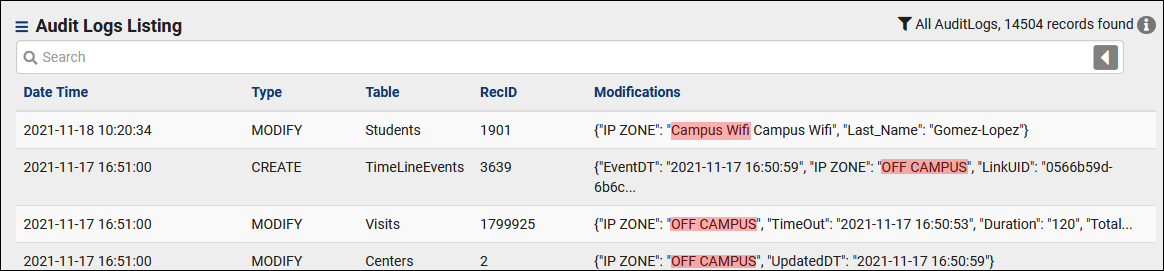
This feature allows you to label certain IP addresses (specific or a range) as on or off-campus, or to a custom zone. This is used for modification logs and kiosk access if configured in permission groups.
Other ➜ Other Options ➜ Preferences ➜ Campus IP Address Blocks.

- On Campus Zone Name & Off Campus Zone Name
- This is the phrasing for your on/off-campus addresses. "On-site," "Campus Network," "Outside," etc.
- On Campus IP Blocks
- This is the actual IP address list that determines what IPs are recorded as being on-campus. If listing a specific device, you can type the IPV4 address here directly. If listing a range of IPs, you would format this as "...0.0/0" with the CIDR notation at the end, as seen in the screenshot above denoting "Campus Wifi."
- Test IP Address
- This is a utility that lets you check a specific IP address to see if it's computed as on or off campus, to verify your current configuration.
- This is a utility that lets you check a specific IP address to see if it's computed as on or off campus, to verify your current configuration.
Usage
- Custom Kiosks
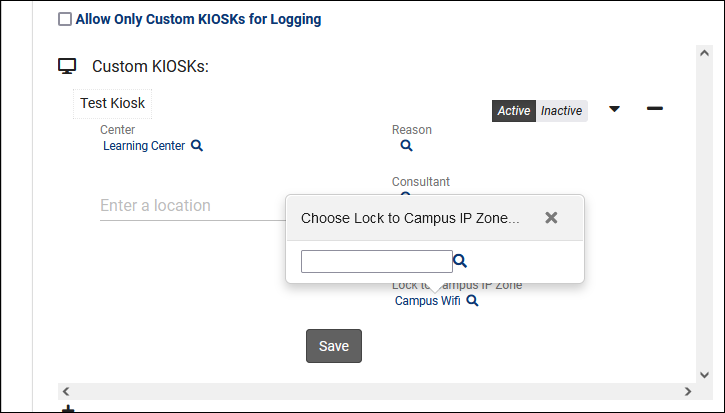
- Custom Kiosks can be locked to a particular IP address to prevent users from accessing the kiosk from unauthorized networks. More information on Custom Kiosks.

- Logging
- When reviewing Audit Logs as a SysAdmin, this allows you to more easily differentiate changes made on-campus versus off.