|
|
Search Symbols
"Search Symbols" can be utilized to specify how you want to search for data in TracCloud. Whether that be all MAT% registrations, or students of all Majors except for #Mathematics, these symbols should help to narrow down your search.
Alphanumeric
| Symbol |
Description |
Example
|
| % |
Wildcard / Search for fields that contain this value. |
Students.First_Name=Jo%
|
| # |
Not / Search for fields that don't match this value. |
Students.First_Name=#John
|
| | |
Or / Search for more than one value at a time. Only applies to Power Search. |
Students.Major: Biology|Photography
|
| [null] |
Search for a null value |
#sql:In-State#=[null]
|
| blankornull |
Search for a blank OR null value, only applies to Power Search. |
Student.Major: blankornull
|
Numeric
| Symbol |
Description |
Example
|
| > |
Greater Than |
Duration=>90
|
| < |
Less Than |
Duration=<90
|
| <= |
Equal to or Less Than |
Duration=<=90
|
| >= |
Equal to or Greater Than |
Duration=>=90
|
| ... |
Date range, used without specifying a field. |
2021-01-01…2021-12-31
|
Combining Multiple Searches
Multiple statements can be used in sequence to find records that match more than one value at a time. The searches are simply separated by a space. The example below shows the process for searching for Major and class.
File:4725369.png
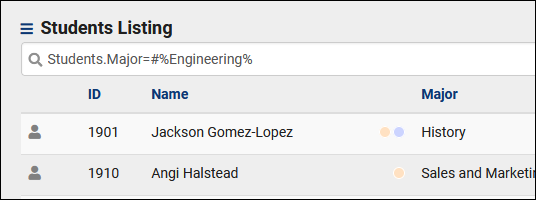
Combining Multiple Symbols
Multiple symbols can be used at once as well. In the example below, we're searching for all students with a major that does not contain the phrase "Engineering." This would exclude students who have a major of Electrical Engineering, Chemical Engineering, Etc.
|

